QuickCode Editor: Lightweight Local Code Editing for Chromebooks
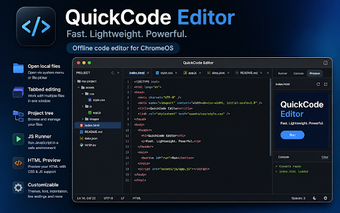
QuickCode Editor (Code Editor for Chromebook), from QuickCode, is a compact, local-first code editor designed to convert a Chromebook into a practical workspace for editing and testing code offline. It focuses on fast local file handling, quick test previews in a contained environment, and small-project editing tools. The app targets web developers and students who prefer device-local workflows and private code testing without relying on cloud IDEs or Linux containers.
What role does QuickCode serve for Chromebook users?
QuickCode is built for quick edits, small projects, and learning tasks on Chromebooks. The app opens local files and folders and presents a project tree for navigation, offers syntax highlighting for popular languages, and keeps multiple documents in internal tabs so users can switch between scripts without leaving the editor. That combination positions it as a step above a basic text editor while avoiding the complexity of a full integrated development environment.
How it behaves with large files and cross-platform usage
The app emphasizes modest resource use and responsive interaction on ChromeOS. It includes a lightweight viewing mode specifically designed to open large log files without slowing the interface, and its multi-document tabbed workspace helps manage concurrent edits. Compatibility with the Chrome browser on desktop platforms means the editor can be used on PC, macOS, or Linux machines running Chrome, preserving a similar local editing experience across systems.
What safety and privacy guarantees does it provide during testing?
The app runs JavaScript in an isolated execution environment and supplies a secure HTML preview mode that blocks network and API access, reducing exposure during on-device testing. Editor sessions and file handling occur locally, and document content is not routed to external servers. Those behaviors let users test snippets and preview pages without sending source code to remote services, a useful property for private projects or classroom exercises.
Does QuickCode fit classroom and short-cycle development workflows?
The app includes conveniences for fast iteration: a built-in Diff Viewer for side-by-side comparisons, a Command Palette and customizable keyboard shortcuts for rapid navigation, plus JSON formatting and automatic indentation alignment. These tools replace common external utilities during code review or teaching activities and help keep formatting consistent. The feature set suits students and developers who focus on frequent edits and short feedback loops on a Chromebook.
QuickCode is a practical choice for Chromebook learners and quick editors
For developers and students needing offline local editing and quick code checks, the app provides a compact, device-held workflow that avoids remote tooling. The free plan limits open documents to three and places a cap on preview trial runs, so users who rely on heavy multitasking or frequent live testing should evaluate those restrictions before making the app their primary editor.